When you’re looking for attractions in remote areas, street names or postcodes are practically useless. With the little Mapcodes, you can pinpoint a spot exactly. Here’s how it works.
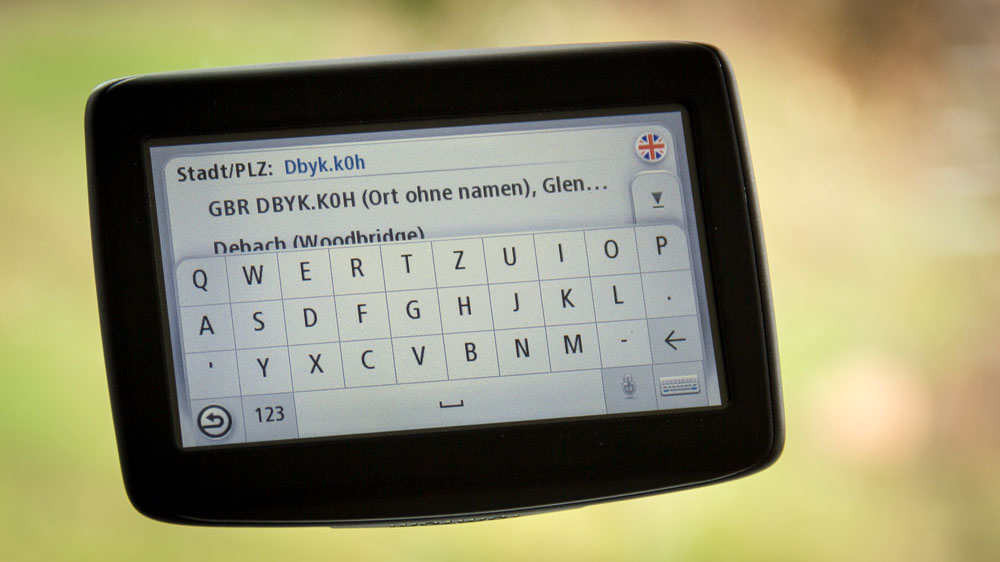
I fell in love with them in Scotland: short codes that let you enter a destination into your sat nav very precisely. Because some small attractions right in the middle of the Highlands sit on streets with no name, no address, and a postcode that covers several square kilometres.
Because it’s so handy, I now add these so-called Mapcodes to every attraction I describe on MyHighlands.de. You’ll find them in the info box in the right-hand sidebar, or – if you’re browsing on your phone – underneath the main text.
That way you too can easily transfer these little location references into your sat nav – although this doesn’t work with every device. More on that in a moment.
What exactly are Mapcodes?
Mapcodes are short groups of four to seven digits or numbers, separated by a dot. They can pinpoint a location on a map exactly, yet unlike latitude and longitude they’re extremely short.
An example:
DBYK.K0H
is the UK Mapcode for the car park at the Glenfinnan Monument.
The Mapcode system is public domain. Any manufacturer can build it into their devices without having to pay for it. Unfortunately, though, few manufacturers actually use it.
The big exception is TomTom – which isn’t all that surprising, since Mapcodes were developed by TomTom’s founders.
You’ll find more information about Mapcodes on their website at www.mapcode.com, where you can also generate a code for any location yourself.
Using Mapcodes in your sat nav
In principle, it’s very simple: instead of the address, you enter the Mapcode. However, your sat nav needs to be set to the correct country. Alternatively, you can put “GBR” for United Kingdom in front of the code, so that the full code would look like this:
GBR DBYK.K0H

That means all the codes shown on MyHighlands.de only work exactly as displayed if your sat nav’s country is set to “United Kingdom” and you include the country prefix – which, admittedly, means a bit more typing.
You enter it either via the address field or via the place search.
What’s the best way to collect the Mapcodes on MyHighlands.de?
I recommend our “Add to Watchlist” feature, which collects all the places on the page “Watchlist – saved attractions” and displays them as a list.
The “Print list” button then outputs the attractions in a print-friendly format.
Which devices work with Mapcodes?
There’s no official list of devices that understand Mapcodes. I contacted Mapcode myself but haven’t had a reply yet.
TomTom lists the following devices on its website as Mapcode-capable:
- GO 40, GO 50, GO 60, GO 400, GO 500, GO 600, GO 5000, GO 6000,
- START 40, START 50, START 60
From my own experience, I can also add the START 20 and 25 devices.
I’d love it if you shared in the comments below whether Mapcodes work with your sat nav – whatever the make. That way I could build up a list here step by step.
Transparency note: This article wasn’t commissioned or paid for by anyone. I just genuinely like Mapcodes in Scotland.